<?xml version="1.0" encoding="utf-8"?>
<feed xmlns="http://www.w3.org/2005/Atom">
    <title>Niklas Haas - RSS feed</title>
    <link href="https://haasn.xyz/atom.xml" rel="self" />
    <link href="https://haasn.xyz" />
    <id>https://haasn.xyz/atom.xml</id>
    <author>
        <name>Niklas Haas</name>
        <email>blog@haasn.xyz</email>
    </author>
    <updated>2018-08-21T00:00:00Z</updated>
    <entry>
    <title>GSoC 2018 Project + Results</title>
    <link href="https://haasn.xyz/posts/2018-08-21-gsoc-2018-results.html" />
    <id>https://haasn.xyz/posts/2018-08-21-gsoc-2018-results.html</id>
    <published>2018-08-21T00:00:00Z</published>
    <updated>2018-08-21T00:00:00Z</updated>
    <summary type="html"><![CDATA[<article>
<header>
<h1>GSoC 2018 Project + Results</h1>
<p>by <em>Niklas Haas</em> on <strong>August 21, 2018</strong></p>
<p>Tagged as: <a title="All pages tagged 'vlc'." href="https://haasn.xyz/tags/vlc.html">vlc</a>, <a title="All pages tagged 'libplacebo'." href="https://haasn.xyz/tags/libplacebo.html">libplacebo</a>.</p>
</header>

<section>
<p>This summer I participated in GSoC, working on <a href="https://github.com/haasn/libplacebo">libplacebo</a> and its integration into VLC.</p>
<h1 id="project-goal">Project Goal</h1>
<p>The idea was to implement a new video output module (vout_placebo) based on both libplacebo and the <a href="http://www.khronos.org/registry/vulkan/">Vulkan graphics API</a>. The ultimate aim was rough feature compatibility with mpv’s <a href="https://github.com/mpv-player/mpv/tree/master/video/out/gpu">vo_gpu</a> renderer, upon which libplacebo is based, but the end was essentially open as far as libplacebo features were concerned.</p>
<h1 id="current-state">Current State</h1>
<p>All of the major essentials are implemented (including direct rendering), and the video output works without any major issues on setups I’ve tested. The current known limitations include:</p>
<ul>
<li><p>Support for subtitles is implemented in libplacebo but still needs to be hooked up to VLC’s module. (easy)</p></li>
<li><p>Not all libplacebo settings are hooked up to GUI options in VLC, specifically the advanced upscaling options are still missing. (easy)</p></li>
<li><p>Frame interpolation / temporal mixing, an attractive vo_gpu feature, is still missing in libplacebo. (hard)</p></li>
<li><p>Missing performance optimizations in some code paths (e.g. plane merging for more efficient debanding / chroma upscaling)</p></li>
</ul>
<p>The features I cared about most (debanding, HDR tone mapping, upscaling, dithering) are all implemented and working.</p>
<h1 id="using-it">Using it</h1>
<h2 id="libplacebo">libplacebo</h2>
<p>libplacebo, which has been developed as an independent library, can be obtained and built by following the <a href="https://github.com/haasn/libplacebo#building-from-source">build instructions</a>, summarized as follows:</p>
<pre class="shell"><code>$ git clone https://github.com/haasn/libplacebo &amp;&amp; cd libplacebo
$ meson build
$ ninja -Cbuild</code></pre>
<p>This will build the libplacebo shared library. If you want to install it system wide, you can use <code>ninja install</code> (however it’s recommended to use proper system packages instead). Refer to the <code>meson</code> documentation for more information about how to customize e.g. the target install directory.</p>
<p>Make sure you have a working Vulkan loader library and driver on your system. There is currently no OpenGL support in libplacebo, nor any immediate plans of adding it.</p>
<h2 id="vlc-module">VLC module</h2>
<p>The VLC module I have been working on is available as a <a href="https://github.com/haasn/vlc/tree/vulkan">WIP branch on GitHub</a>. It will be merged into VLC upstream once the last bits (subtitle support, missing GUI options) are added and the code has undergone a final evaluation / inspection / cleanup pass.</p>
<p>You can build it the same way you build VLC. To make sure vulkan and libplacebo are supported and enabled, use <code>./configure --enable-libplacebo --enable-vulkan</code> when building.</p>
<p>To use it, simply choose the “Vulkan” video output option in the VLC settings. All of the video quality settings for customizing the use of libplacebo’s features are found in the advanced options dialog in VLC.</p>
</section>
</article>
<footer>
<script src="https://utteranc.es/client.js" repo="haasn/blog" issue-term="pathname" label="comments" theme="photon-dark" crossorigin="anonymous" async>
</script>
<noscript>
        <h2>comments and questions can be left <a href="https://github.com/haasn/blog/issues">here</a></h2>
        (or you could enable JavaScript and get comment integration)
</noscript>
</footer>
]]></summary>
</entry>
<entry>
    <title>How to benchmark mpv's raw throughput</title>
    <link href="https://haasn.xyz/posts/2017-10-05-how-to-benchmark-mpvs-raw-throughput.html" />
    <id>https://haasn.xyz/posts/2017-10-05-how-to-benchmark-mpvs-raw-throughput.html</id>
    <published>2017-10-05T00:00:00Z</published>
    <updated>2017-10-05T00:00:00Z</updated>
    <summary type="html"><![CDATA[<article>
<header>
<h1>How to benchmark mpv's raw throughput</h1>
<p>by <em>Niklas Haas</em> on <strong>October  5, 2017</strong></p>
<p>Tagged as: <a title="All pages tagged 'video'." href="https://haasn.xyz/tags/video.html">video</a>, <a title="All pages tagged 'mpv'." href="https://haasn.xyz/tags/mpv.html">mpv</a>, <a title="All pages tagged 'tips'." href="https://haasn.xyz/tags/tips.html">tips</a>.</p>
</header>

<section>
<p>mpv exports pass timers which allow you to benchmark the performance in theory, but in practice these are very unreliable in multiple scenarios:</p>
<ol type="1">
<li>Some drivers group the timer queries into the wrong command buffer, causing the first measured pass to include the time spent waiting for the vsync.</li>
<li>Some drivers overlap the timer durations for jobs running in parallel, thus leading to an over-counting of the time spent on each pass.</li>
<li>Some drivers just flat out refuse to report timer results at all.</li>
<li>Some timers (and in particular, the vulkan code) outsource asynchronous commands to different queues, not all of which even support timers; leading to passes being measured as 0μs despite taking time in reality.</li>
</ol>
<p>Instead, a more comparable way to benchmark the raw throughput of mpv is to uncap the framerate and see how fast you can push frames. The most basic way to accomplish this is with a profile like this:</p>
<div class="sourceCode" id="cb1"><pre class="sourceCode ini"><code class="sourceCode ini"><span id="cb1-1"><a href="https://haasn.xyz#cb1-1" aria-hidden="true"></a><span class="kw">[bench]</span></span>
<span id="cb1-2"><a href="https://haasn.xyz#cb1-2" aria-hidden="true"></a><span class="dt">audio</span><span class="ot">=</span><span class="kw">no</span></span>
<span id="cb1-3"><a href="https://haasn.xyz#cb1-3" aria-hidden="true"></a><span class="dt">untimed</span><span class="ot">=</span><span class="kw">yes</span></span>
<span id="cb1-4"><a href="https://haasn.xyz#cb1-4" aria-hidden="true"></a><span class="dt">video-sync</span><span class="ot">=</span><span class="st">display-desync</span></span>
<span id="cb1-5"><a href="https://haasn.xyz#cb1-5" aria-hidden="true"></a><span class="dt">vulkan-swap-mode</span><span class="ot">=</span><span class="st">immediate</span></span>
<span id="cb1-6"><a href="https://haasn.xyz#cb1-6" aria-hidden="true"></a><span class="dt">opengl-swapinterval</span><span class="ot">=</span><span class="dv">0</span></span>
<span id="cb1-7"><a href="https://haasn.xyz#cb1-7" aria-hidden="true"></a><span class="dt">d3d11-sync-interval</span><span class="ot">=</span><span class="dv">0</span></span>
<span id="cb1-8"><a href="https://haasn.xyz#cb1-8" aria-hidden="true"></a><span class="dt">osd-msg1</span><span class="ot">=</span><span class="st">&quot;FPS: ${estimated-display-fps}&quot;</span></span></code></pre></div>
<h2 id="disclaimer-caveats">Disclaimer / caveats</h2>
<ol type="1">
<li><p>This relies on you being able to uncap the rendering. Some systems don’t support this configuration correctly. On some systems you need to use <code>--vulkan-swap-mode=mailbox</code> instead. On other systems, you have no way of disabling OpenGL vsync at all; or you need to force it off in the driver. Obviously, if the measured FPS is exactly equal to your display FPS (e.g. 60 Hz), the results are invalid.</p></li>
<li><p>This requires your CPU to be able to decode the file as fast as you’re trying to render it. So if you’re using this with really light settings, you’d end up rendering at like 3000 fps and maxing out on the decoding speed. Obviously, such scenarios are unrealistic. This test only really makes sense when GPU rendering is the bottleneck; i.e. when you’re using heavy scalers.</p></li>
<li><p>The display-sync logic still applies. This means that, for example, if the video is 24 fps and your display identifies itself as 60 fps. mpv will draw one fresh frame followed by two redraws of the same frame (which are just cheap blits), specifics depending on the exact pattern needed to synchronize the two framerates. So as a result, your estimated FPS will be way higher than your GPU is actually doing work. For example, it may report 300 fps when in reality your GPU is only processing ~100 frames per second. In essence, what’s happening is that it’s measuring the number of vsyncs it can output per second - not the number of video frames it can render. To solve this, you can either use <code>--display-fps</code> to trick the display sync code into simulating a lower or higher display FPS,<a href="https://haasn.xyz#fn1" class="footnote-ref" id="fnref1" role="doc-noteref"><sup>1</sup></a> or you can use <code>--speed</code> to make the video faster or slower. For example, to display a 24 Hz video on a 60 Hz display you can use <code>-speed 2.5</code> to lock the video framerate to the display framerate.</p></li>
<li><p>Actually drawing the OSD can cause the performance to decrease. Although in this case, the difference shouldn’t be that big, it makes a big difference when using <a href="https://github.com/Argon-/mpv-stats">stats.lua</a>, especially at high screen resolutions. So I recommend sticking to the <code>osd-msg1</code>, or perhaps switching to <code>term-status-msg</code> instead if needed.</p></li>
</ol>
<section class="footnotes" role="doc-endnotes">
<hr />
<ol>
<li id="fn1" role="doc-endnote"><p>This is actually useful if you want to see if you could, for example, upgrade from a 60 Hz monitor to a 144 Hz monitor without framedrops. If you can render with <code>--display-fps=144 --profile=bench</code> at 144 FPS or more, then you’re good to go. (For this type of content)<a href="https://haasn.xyz#fnref1" class="footnote-back" role="doc-backlink">↩︎</a></p></li>
</ol>
</section>
</section>
</article>
<footer>
<script src="https://utteranc.es/client.js" repo="haasn/blog" issue-term="pathname" label="comments" theme="photon-dark" crossorigin="anonymous" async>
</script>
<noscript>
        <h2>comments and questions can be left <a href="https://github.com/haasn/blog/issues">here</a></h2>
        (or you could enable JavaScript and get comment integration)
</noscript>
</footer>
]]></summary>
</entry>
<entry>
    <title>Jailing specific processes inside a VPN</title>
    <link href="https://haasn.xyz/posts/2017-05-09-jailing-specific-processes-inside-a-vpn.html" />
    <id>https://haasn.xyz/posts/2017-05-09-jailing-specific-processes-inside-a-vpn.html</id>
    <published>2017-05-09T00:00:00Z</published>
    <updated>2017-05-09T00:00:00Z</updated>
    <summary type="html"><![CDATA[<article>
<header>
<h1>Jailing specific processes inside a VPN</h1>
<p>by <em>Niklas Haas</em> on <strong>May  9, 2017</strong></p>
<p>Tagged as: <a title="All pages tagged 'networking'." href="https://haasn.xyz/tags/networking.html">networking</a>, <a title="All pages tagged 'linux'." href="https://haasn.xyz/tags/linux.html">linux</a>, <a title="All pages tagged 'tips'." href="https://haasn.xyz/tags/tips.html">tips</a>.</p>
</header>

<section>
<p>I’ve always wondered how difficult it would be to do something like this, so I decided to give it a try. Turns out the answer is, since the addition of UID matching to <code>ip rule</code>, not very difficult.</p>
<h2 id="iproute2-configuration">iproute2 configuration</h2>
<p>The basic approach is to give the VPN interface a separate routing table, and redirect suspect processes to that routing table instead. Since working with numeric IDs directly is sort of a pain, you can give them friendly names:</p>
<div class="sourceCode" id="cb1"><pre class="sourceCode bash"><code class="sourceCode bash"><span id="cb1-1"><a href="https://haasn.xyz#cb1-1" aria-hidden="true"></a>$ <span class="fu">cat</span> /etc/iproute2/rt_tables</span>
<span id="cb1-2"><a href="https://haasn.xyz#cb1-2" aria-hidden="true"></a><span class="co">#</span></span>
<span id="cb1-3"><a href="https://haasn.xyz#cb1-3" aria-hidden="true"></a><span class="co"># reserved values</span></span>
<span id="cb1-4"><a href="https://haasn.xyz#cb1-4" aria-hidden="true"></a><span class="co">#</span></span>
<span id="cb1-5"><a href="https://haasn.xyz#cb1-5" aria-hidden="true"></a><span class="ex">255</span>	local</span>
<span id="cb1-6"><a href="https://haasn.xyz#cb1-6" aria-hidden="true"></a><span class="ex">254</span>	main</span>
<span id="cb1-7"><a href="https://haasn.xyz#cb1-7" aria-hidden="true"></a><span class="ex">253</span>	default</span>
<span id="cb1-8"><a href="https://haasn.xyz#cb1-8" aria-hidden="true"></a><span class="ex">0</span>	unspec</span>
<span id="cb1-9"><a href="https://haasn.xyz#cb1-9" aria-hidden="true"></a><span class="co">#</span></span>
<span id="cb1-10"><a href="https://haasn.xyz#cb1-10" aria-hidden="true"></a><span class="co"># local</span></span>
<span id="cb1-11"><a href="https://haasn.xyz#cb1-11" aria-hidden="true"></a><span class="co">#</span></span>
<span id="cb1-12"><a href="https://haasn.xyz#cb1-12" aria-hidden="true"></a><span class="ex">1</span>	vpn</span></code></pre></div>
<h2 id="confining-your-process-to-a-specific-user">Confining your process to a specific user</h2>
<p>Since <code>ip rule</code> can only match based on UID, rather than PID (which is more stable anyway), the first step is making sure your process is running under some suitable user. For example, suppose you’re trying to isolate <code>transmission-daemon</code>, then the appropriate user would be <code>transmission</code>, which (at least on my system) <code>transmission-daemon</code> gets run under. If your program lacks such a convenient user, then you could always add your own and use something like sudo to switch to it, e.g.:</p>
<div class="sourceCode" id="cb2"><pre class="sourceCode bash"><code class="sourceCode bash"><span id="cb2-1"><a href="https://haasn.xyz#cb2-1" aria-hidden="true"></a>$ <span class="fu">cat</span> /etc/sudoers.d/rtorrent</span>
<span id="cb2-2"><a href="https://haasn.xyz#cb2-2" aria-hidden="true"></a><span class="ex">joe</span> ALL = (rtorrent) <span class="ex">NOPASSWD</span>: /usr/bin/rtorrent</span></code></pre></div>
<p>Then user <code>joe</code> could use <code>sudo -u rtorrent /usr/bin/rtorrent</code> to run rtorrent as a separate user <code>rtorrent</code>.</p>
<h2 id="openvpn-configuration">OpenVPN configuration</h2>
<p>The second part of the configuration is making sure to set up the correct routing table as part of OpenVPN’s initialization. For the purposes of this example, I want to ignore the VPN provider’s pushed routes (since they try overriding my system-wide routing to go through their VPN, whereas I only want it for certain processes), which the addition of <code>route-noexec</code> solves.</p>
<div class="sourceCode" id="cb3"><pre class="sourceCode bash"><code class="sourceCode bash"><span id="cb3-1"><a href="https://haasn.xyz#cb3-1" aria-hidden="true"></a>$ <span class="fu">cat</span> /etc/openvpn/example/openvpn.conf</span>
<span id="cb3-2"><a href="https://haasn.xyz#cb3-2" aria-hidden="true"></a><span class="ex">...</span></span>
<span id="cb3-3"><a href="https://haasn.xyz#cb3-3" aria-hidden="true"></a><span class="ex">script-security</span> 2</span>
<span id="cb3-4"><a href="https://haasn.xyz#cb3-4" aria-hidden="true"></a><span class="ex">route-noexec</span></span>
<span id="cb3-5"><a href="https://haasn.xyz#cb3-5" aria-hidden="true"></a><span class="ex">route-up</span> /etc/openvpn/example/route.sh</span>
<span id="cb3-6"><a href="https://haasn.xyz#cb3-6" aria-hidden="true"></a><span class="ex">route-pre-down</span> /etc/openvpn/example/route-down.sh</span></code></pre></div>
<div class="sourceCode" id="cb4"><pre class="sourceCode bash"><code class="sourceCode bash"><span id="cb4-1"><a href="https://haasn.xyz#cb4-1" aria-hidden="true"></a>$ <span class="fu">cat</span> /etc/openvpn/example/route.sh</span>
<span id="cb4-2"><a href="https://haasn.xyz#cb4-2" aria-hidden="true"></a><span class="co">#!/bin/sh</span></span>
<span id="cb4-3"><a href="https://haasn.xyz#cb4-3" aria-hidden="true"></a><span class="fu">sudo</span> ip route add default via <span class="va">$route_vpn_gateway</span> table vpn</span>
<span id="cb4-4"><a href="https://haasn.xyz#cb4-4" aria-hidden="true"></a></span>
<span id="cb4-5"><a href="https://haasn.xyz#cb4-5" aria-hidden="true"></a><span class="co"># Confine transmission and rtorrent to this table (as an example)</span></span>
<span id="cb4-6"><a href="https://haasn.xyz#cb4-6" aria-hidden="true"></a><span class="kw">for</span> <span class="ex">user</span> in rtorrent transmission<span class="kw">;</span> <span class="kw">do</span></span>
<span id="cb4-7"><a href="https://haasn.xyz#cb4-7" aria-hidden="true"></a>    <span class="va">uid=$(</span><span class="fu">id</span> -u <span class="va">$user)</span></span>
<span id="cb4-8"><a href="https://haasn.xyz#cb4-8" aria-hidden="true"></a>    <span class="fu">sudo</span> ip rule add uidrange <span class="va">$uid</span>-<span class="va">$uid</span> table vpn</span>
<span id="cb4-9"><a href="https://haasn.xyz#cb4-9" aria-hidden="true"></a><span class="kw">done</span></span></code></pre></div>
<div class="sourceCode" id="cb5"><pre class="sourceCode bash"><code class="sourceCode bash"><span id="cb5-1"><a href="https://haasn.xyz#cb5-1" aria-hidden="true"></a>$ <span class="fu">cat</span> /etc/openvpn/example/route-down.sh</span>
<span id="cb5-2"><a href="https://haasn.xyz#cb5-2" aria-hidden="true"></a><span class="co">#!/bin/sh</span></span>
<span id="cb5-3"><a href="https://haasn.xyz#cb5-3" aria-hidden="true"></a><span class="fu">sudo</span> ip route flush table vpn</span>
<span id="cb5-4"><a href="https://haasn.xyz#cb5-4" aria-hidden="true"></a></span>
<span id="cb5-5"><a href="https://haasn.xyz#cb5-5" aria-hidden="true"></a><span class="co"># Delete all ip rules that mention this table</span></span>
<span id="cb5-6"><a href="https://haasn.xyz#cb5-6" aria-hidden="true"></a><span class="kw">while</span> <span class="fu">sudo</span> ip rule del table vpn<span class="kw">;</span> <span class="kw">do</span> <span class="bu">:</span><span class="kw">;</span> <span class="kw">done</span></span></code></pre></div>
<p>The magic happens due to the <code>ip rule</code> invocation. Basically, it creates a rule that looks like this:</p>
<div class="sourceCode" id="cb6"><pre class="sourceCode bash"><code class="sourceCode bash"><span id="cb6-1"><a href="https://haasn.xyz#cb6-1" aria-hidden="true"></a>$ <span class="ex">ip</span> rule list</span>
<span id="cb6-2"><a href="https://haasn.xyz#cb6-2" aria-hidden="true"></a><span class="ex">0</span>:	from all lookup local </span>
<span id="cb6-3"><a href="https://haasn.xyz#cb6-3" aria-hidden="true"></a><span class="ex">32765</span>:	from all uidrange 141-141 lookup vpn </span>
<span id="cb6-4"><a href="https://haasn.xyz#cb6-4" aria-hidden="true"></a><span class="ex">32766</span>:	from all lookup main </span>
<span id="cb6-5"><a href="https://haasn.xyz#cb6-5" aria-hidden="true"></a><span class="ex">32767</span>:	from all lookup default </span></code></pre></div>
<p>This means that any packet originating from UID <code>141-141</code> (i.e. <code>transmission</code>) will get routed as according to the table <code>vpn</code>, which looks like this: (as an example)</p>
<div class="sourceCode" id="cb7"><pre class="sourceCode bash"><code class="sourceCode bash"><span id="cb7-1"><a href="https://haasn.xyz#cb7-1" aria-hidden="true"></a>$ <span class="ex">ip</span> route list table vpn</span>
<span id="cb7-2"><a href="https://haasn.xyz#cb7-2" aria-hidden="true"></a><span class="ex">default</span> via 10.128.0.1 dev tun0 </span></code></pre></div>
<h3 id="ip-and-root-privileges"><code>ip</code> and root privileges</h3>
<p>For these scripts to work, openvpn needs to be able to execute <code>ip</code> commands (with root privilege). You could either accomplish this by preventing <code>openvpn</code> from ever dropping privileges (bad), or, as I prefer, using <code>sudo</code> to re-gain access to <code>ip</code> for the openvpn user:</p>
<div class="sourceCode" id="cb8"><pre class="sourceCode bash"><code class="sourceCode bash"><span id="cb8-1"><a href="https://haasn.xyz#cb8-1" aria-hidden="true"></a>$ <span class="fu">cat</span> /etc/sudoers.d/openvpn</span>
<span id="cb8-2"><a href="https://haasn.xyz#cb8-2" aria-hidden="true"></a><span class="ex">openvpn</span> ALL = (root) <span class="ex">NOPASSWD</span>: /bin/ip</span></code></pre></div>
<p>Note that dropping privileges for OpenVPN is done by adding something like the following to your <code>openvpn.conf</code>:</p>
<div class="sourceCode" id="cb9"><pre class="sourceCode bash"><code class="sourceCode bash"><span id="cb9-1"><a href="https://haasn.xyz#cb9-1" aria-hidden="true"></a><span class="ex">persist-key</span></span>
<span id="cb9-2"><a href="https://haasn.xyz#cb9-2" aria-hidden="true"></a><span class="ex">persist-tun</span></span>
<span id="cb9-3"><a href="https://haasn.xyz#cb9-3" aria-hidden="true"></a><span class="ex">user</span> openvpn</span>
<span id="cb9-4"><a href="https://haasn.xyz#cb9-4" aria-hidden="true"></a><span class="ex">group</span> openvpn</span></code></pre></div>
<h2 id="linux-configuration">Linux configuration</h2>
<p>It’s possible that due to the way source route verification works under Linux, you will not receive any replies directed your way (and e.g. <code>ping</code> as the confined user will fail). The solution to this is setting <code>rp_filter</code> to 2, e.g.</p>
<div class="sourceCode" id="cb10"><pre class="sourceCode bash"><code class="sourceCode bash"><span id="cb10-1"><a href="https://haasn.xyz#cb10-1" aria-hidden="true"></a>$ <span class="fu">cat</span> /etc/sysctl.d/20-disable-rp_filter.conf</span>
<span id="cb10-2"><a href="https://haasn.xyz#cb10-2" aria-hidden="true"></a><span class="ex">net.ipv4.conf.default.rp_filter</span> = 2</span>
<span id="cb10-3"><a href="https://haasn.xyz#cb10-3" aria-hidden="true"></a><span class="ex">net.ipv4.conf.all.rp_filter</span> = 2</span></code></pre></div>
<p>followed by <code>sysctl -p</code>.</p>
<p>If it still doesn’t work, you may need to flush the routing cache, i.e. <code>ip route flush cache</code>.</p>
<h1 id="disclaimer-and-warning">Disclaimer and warning</h1>
<h2 id="a-word-on-dns">A word on DNS</h2>
<p>If you use a local DNS server (e.g. one pushed by your DHCP server), then DNS lookups from the <code>confined</code> user will fail, because there’s no appropriate route for the local DNS server. There are several solutions to this:</p>
<ol type="1">
<li>Use a public DNS server that’s accessible via the VPN as well.</li>
<li>Hard-code domains you care about to <code>/etc/hosts</code>.</li>
<li>Add an extra route for your local DNS server to the <code>vpn</code> table.</li>
</ol>
<p>While #3 seems the most attractive, this is a privacy risk because DNS requests will leak your real IP! Only do this if you’re sure you know what you’re signing yourself up for.</p>
<h2 id="other-sources-of-ip-leaks">Other sources of IP leaks</h2>
<p>It’s possible that all your effort will be for naught and your client will find other ways of leaking your ‘real’ IP to the internet. Unless you have carefully audited and tested your specific program, do <strong>NOT</strong> take this guide as any sort of guarantee. WebRTC, torrent clients etc. have all found ways to inadvertently de-anonymize VPN users.</p>
<p>One website you can use for testing these sorts of things is <code>ipleak.net</code>, which includes support for testing torrent clients in particular. Handy if you just want to make sure your client isn’t egregiously advertising your real IP to trackers.</p>
</section>
</article>
<footer>
<script src="https://utteranc.es/client.js" repo="haasn/blog" issue-term="pathname" label="comments" theme="photon-dark" crossorigin="anonymous" async>
</script>
<noscript>
        <h2>comments and questions can be left <a href="https://github.com/haasn/blog/issues">here</a></h2>
        (or you could enable JavaScript and get comment integration)
</noscript>
</footer>
]]></summary>
</entry>
<entry>
    <title>The Diablo III paragon system visualized</title>
    <link href="https://haasn.xyz/posts/2017-02-18-the-diablo-iii-paragon-system-visualized.html" />
    <id>https://haasn.xyz/posts/2017-02-18-the-diablo-iii-paragon-system-visualized.html</id>
    <published>2017-02-18T00:00:00Z</published>
    <updated>2017-02-18T00:00:00Z</updated>
    <summary type="html"><![CDATA[<article>
<header>
<h1>The Diablo III paragon system visualized</h1>
<p>by <em>Niklas Haas</em> on <strong>February 18, 2017</strong></p>
<p>Tagged as: <a title="All pages tagged 'games'." href="https://haasn.xyz/tags/games.html">games</a>.</p>
</header>

<section>
<p><strong>Update 2017-02-18</strong>: The XP/level curve I was using in the first iteration of this post was based on a previous version of the game. The current XP curve paints a very different picture. I have updated the graphs.</p>
<p>Since it was bugging me, I decided to visualize some of the relationships between playtime, paragon, greater rifts and power levels.</p>
<h1 id="baseline-assumptions">Baseline assumptions</h1>
<p>Since we have to use some reference point, I’ll offer my own gear. For ease of comparison, I’m going to ignore everything below paragon 800 and use that as my “starting point”.</p>
<p>I’m pretty decently equipped, and using only the points available to me at paragon 800 I have somewhere in the ballpark of 15,000 dex and 10,000 additional bonus armor from gear:</p>
<div class="sourceCode" id="cb1"><pre class="sourceCode haskell"><code class="sourceCode haskell"><span id="cb1-1"><a href="https://haasn.xyz#cb1-1" aria-hidden="true"></a>baseDex <span class="ot">=</span> <span class="dv">15000</span></span>
<span id="cb1-2"><a href="https://haasn.xyz#cb1-2" aria-hidden="true"></a>baseArmor <span class="ot">=</span> <span class="dv">10000</span></span></code></pre></div>
<p>At this gear level and no further paragon points, I can do something like 180 billion XP/hour on a good day, speed-farming GR75 or so. (solo)</p>
<div class="sourceCode" id="cb2"><pre class="sourceCode haskell"><code class="sourceCode haskell"><span id="cb2-1"><a href="https://haasn.xyz#cb2-1" aria-hidden="true"></a>baseXph <span class="ot">=</span> <span class="dv">180</span></span></code></pre></div>
<p>In terms of progress, with this gear level, I can do something like GR 90.</p>
<div class="sourceCode" id="cb3"><pre class="sourceCode haskell"><code class="sourceCode haskell"><span id="cb3-1"><a href="https://haasn.xyz#cb3-1" aria-hidden="true"></a>baseRiftLevel <span class="ot">=</span> <span class="dv">90</span></span></code></pre></div>
<h1 id="basic-relationships">Basic relationships</h1>
<p>In order to establish some common relationships, a few basic definitions:</p>
<h2 id="main-stat-versus-paragon-level">Main stat versus paragon level</h2>
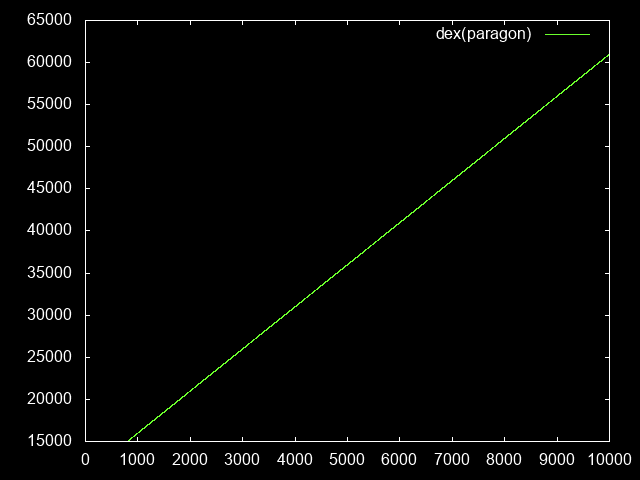
<p>This is pretty trivial. Each paragon level is 5 dex more.</p>
<div class="sourceCode" id="cb4"><pre class="sourceCode haskell"><code class="sourceCode haskell"><span id="cb4-1"><a href="https://haasn.xyz#cb4-1" aria-hidden="true"></a>dexPara(paraLevel) <span class="ot">=</span> baseDex <span class="op">+</span> <span class="dv">5</span> <span class="op">*</span> (paraLevel <span class="op">-</span> <span class="dv">800</span>)</span></code></pre></div>
<figure>
<img src="https://haasn.xyz/files/d3para/dexPara.png" alt="Dexterity as a function of paragon level" /><figcaption aria-hidden="true">Dexterity as a function of paragon level</figcaption>
</figure>
<h2 id="main-stat-versus-damage-output">Main stat versus damage output</h2>
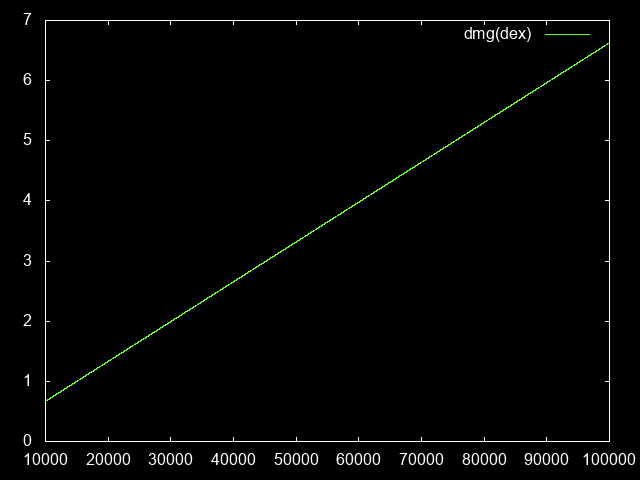
<p>Each point of dexterity increases my damage by 1%, stacking additively with itself. For simplicity, we’ll normalize it so that ‘1’ is my baseline damage.</p>
<div class="sourceCode" id="cb5"><pre class="sourceCode haskell"><code class="sourceCode haskell"><span id="cb5-1"><a href="https://haasn.xyz#cb5-1" aria-hidden="true"></a>damageDex(dex) <span class="ot">=</span> (<span class="dv">1</span> <span class="op">+</span> dex <span class="op">/</span> <span class="dv">100</span>) <span class="op">/</span> (<span class="dv">1</span> <span class="op">+</span> baseDex <span class="op">/</span> <span class="dv">100</span>)</span></code></pre></div>
<figure>
<img src="https://haasn.xyz/files/d3para/damageDex.png" alt="Damage increase as a function of dexterity" /><figcaption aria-hidden="true">Damage increase as a function of dexterity</figcaption>
</figure>
<h2 id="main-stat-versus-damage-mitigation">Main stat versus damage mitigation</h2>
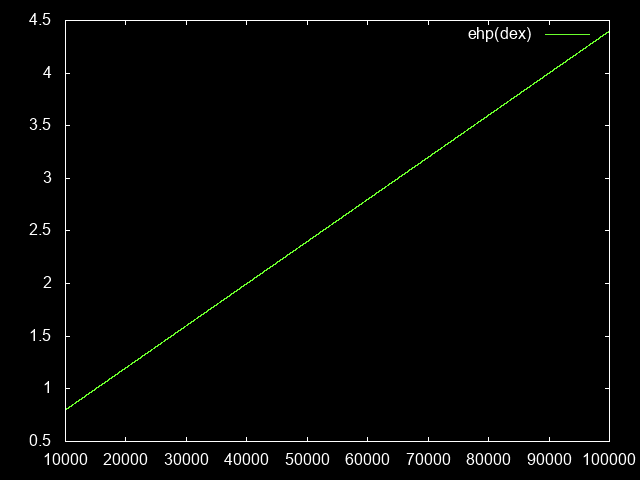
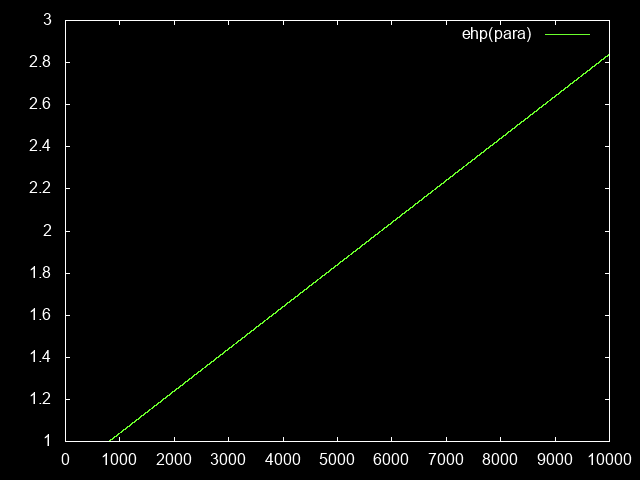
<p>Twice as much armor = Half as much damage, so we can just calculate this in terms of the baseline. Again, ‘1’ means my baseline damage mitigation.</p>
<div class="sourceCode" id="cb6"><pre class="sourceCode haskell"><code class="sourceCode haskell"><span id="cb6-1"><a href="https://haasn.xyz#cb6-1" aria-hidden="true"></a>toughnessDex(dex) <span class="ot">=</span> (baseArmor <span class="op">+</span> dex) <span class="op">/</span> (baseArmor <span class="op">+</span> baseDex)</span>
<span id="cb6-2"><a href="https://haasn.xyz#cb6-2" aria-hidden="true"></a>toughnessPara(paraLevel) <span class="ot">=</span> toughnessDex(dexPara(paraLevel))</span></code></pre></div>
<figure>
<img src="https://haasn.xyz/files/d3para/toughnessDex.png" alt="Toughness as a function of dexterity" /><figcaption aria-hidden="true">Toughness as a function of dexterity</figcaption>
</figure>
<figure>
<img src="https://haasn.xyz/files/d3para/toughnessPara.png" alt="Toughness as a function of paragon level" /><figcaption aria-hidden="true">Toughness as a function of paragon level</figcaption>
</figure>
<h2 id="gr-level-versus-mob-hp">GR level versus mob HP</h2>
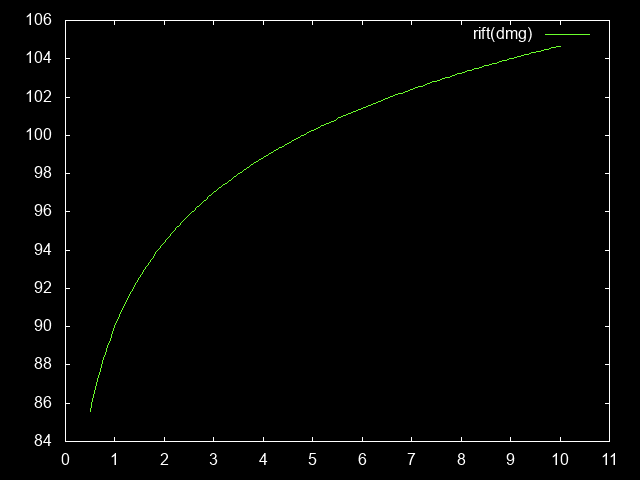
<p>Each additional GR level increases mob HP by 17%. We can use my baseline as a reference point for how much damage you need to be dealing per GR level, and scale it from there.</p>
<div class="sourceCode" id="cb7"><pre class="sourceCode haskell"><code class="sourceCode haskell"><span id="cb7-1"><a href="https://haasn.xyz#cb7-1" aria-hidden="true"></a>riftLevelDamage(damage) <span class="ot">=</span> baseRiftLevel <span class="op">+</span> <span class="fu">logBase</span> <span class="fl">1.17</span> damage</span></code></pre></div>
<figure>
<img src="https://haasn.xyz/files/d3para/riftLevelDamage.png" alt="Rift level as a function of damage increase" /><figcaption aria-hidden="true">Rift level as a function of damage increase</figcaption>
</figure>
<h2 id="mob-damage-versus-gr-level">Mob damage versus GR level</h2>
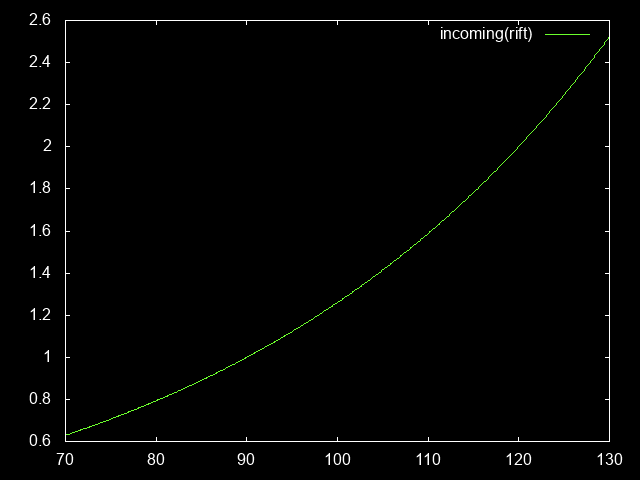
<p>For each level above GR70, mobs deal 2.34% more damage. So the increase in toughness required per GR level is as follows:</p>
<div class="sourceCode" id="cb8"><pre class="sourceCode haskell"><code class="sourceCode haskell"><span id="cb8-1"><a href="https://haasn.xyz#cb8-1" aria-hidden="true"></a>incomingDamage(riftLevel) <span class="ot">=</span> <span class="fl">1.0234</span> <span class="op">**</span> (riftLevel <span class="op">-</span> baseRiftLevel)</span></code></pre></div>
<figure>
<img src="https://haasn.xyz/files/d3para/incomingDamage.png" alt="Incoming damage as a function of rift level" /><figcaption aria-hidden="true">Incoming damage as a function of rift level</figcaption>
</figure>
<h1 id="derived-functions">Derived functions</h1>
<p>Now we’re ready to look at the first set of relationships between these curves:</p>
<h2 id="damage-output-versus-paragon-level">Damage output versus paragon level</h2>
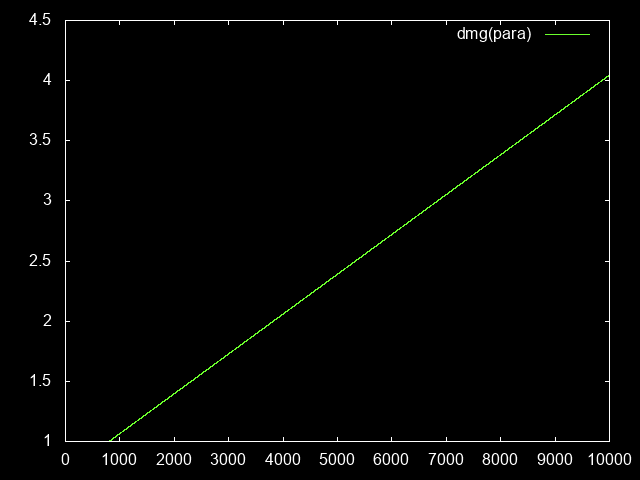
<p>More paragon = more dex = more damage. Simple enough. Plug one into the other:</p>
<div class="sourceCode" id="cb9"><pre class="sourceCode haskell"><code class="sourceCode haskell"><span id="cb9-1"><a href="https://haasn.xyz#cb9-1" aria-hidden="true"></a>damagePara(paraLevel) <span class="ot">=</span> damageDex(dexPara(paraLevel))</span></code></pre></div>
<figure>
<img src="https://haasn.xyz/files/d3para/damagePara.png" alt="Damage output as a function of paragon level" /><figcaption aria-hidden="true">Damage output as a function of paragon level</figcaption>
</figure>
<h2 id="gr-level-versus-paragon-level">GR level versus paragon level</h2>
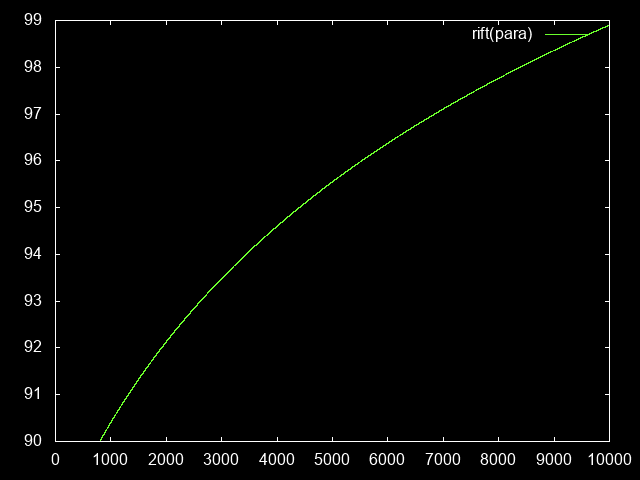
<p>Take the previous curve and plug it into the damage &lt;-&gt; GR level curve:</p>
<div class="sourceCode" id="cb10"><pre class="sourceCode haskell"><code class="sourceCode haskell"><span id="cb10-1"><a href="https://haasn.xyz#cb10-1" aria-hidden="true"></a>riftLevelPara(paraLevel) <span class="ot">=</span> riftLevelDamage(damagePara(paraLevel))</span></code></pre></div>
<figure>
<img src="https://haasn.xyz/files/d3para/riftLevelPara.png" alt="Rift level as a function of paragon level" /><figcaption aria-hidden="true">Rift level as a function of paragon level</figcaption>
</figure>
<h2 id="incoming-damage-at-this-paragon-level">Incoming damage at this paragon level</h2>
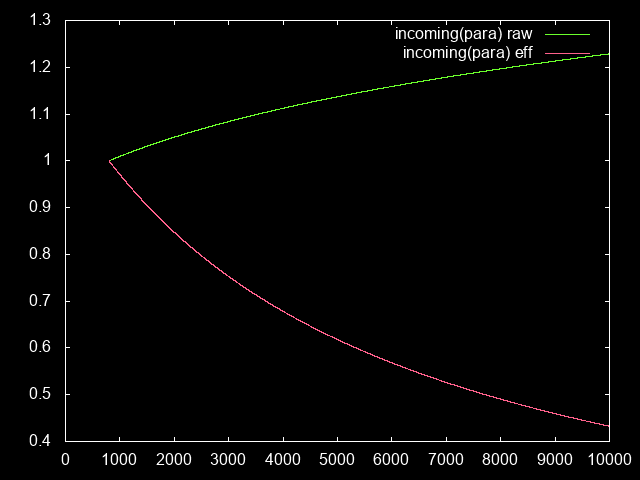
<p>Of course, at this higher GR level, we’ll also be receiving more incoming damage.</p>
<div class="sourceCode" id="cb11"><pre class="sourceCode haskell"><code class="sourceCode haskell"><span id="cb11-1"><a href="https://haasn.xyz#cb11-1" aria-hidden="true"></a>incomingDamageRaw(paraLevel) <span class="ot">=</span> incomingDamage(riftLevelPara(paraLevel))</span>
<span id="cb11-2"><a href="https://haasn.xyz#cb11-2" aria-hidden="true"></a>incomingDamageEff(paraLevel) <span class="ot">=</span> incomingDamageRaw(paraLevel) <span class="op">/</span> toughnessPara(paraLevel)</span></code></pre></div>
<figure>
<img src="https://haasn.xyz/files/d3para/incomingDamagePara.png" alt="Incoming damage in GR as a function of paragon level" /><figcaption aria-hidden="true">Incoming damage in GR as a function of paragon level</figcaption>
</figure>
<p>Even though the raw damage increase is going up, the actual effective damage (relative to how much armor we gain) is going down; meaning we actually have an easier time surviving than in the lower GR90.</p>
<p>Note: This means that, technically, we could swap out a 50% defensive modifier (e.g. crystal fist) for an offensive piece of gear at para 9000, and still survive. But we’ll ignore this effect for now, for the sake of moving on to more interesting things.</p>
<h1 id="the-time-axis">The time axis</h1>
<p>All this is well and good, but my main interest lies in how all of these stats correlate with actual playtime. So first, we need to figure out how XP scaling works.</p>
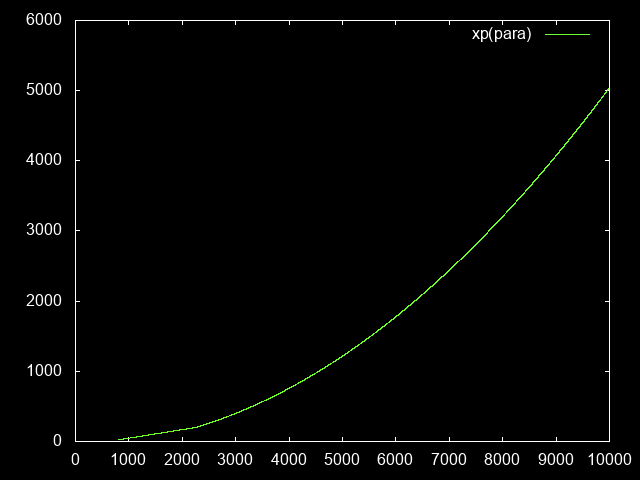
<p>As of patch 2.4.2 (S8), the paragon curve above p800 is subdivided into two halves: There’s a p800-2250 segment, which increases linearly starting from 23 (billion) and ending at 200. After that, it increases quadratically, gaining by 102 thousand per level.</p>
<div class="sourceCode" id="cb12"><pre class="sourceCode haskell"><code class="sourceCode haskell"><span id="cb12-1"><a href="https://haasn.xyz#cb12-1" aria-hidden="true"></a>xpLevel(paraLevel)</span>
<span id="cb12-2"><a href="https://haasn.xyz#cb12-2" aria-hidden="true"></a>  <span class="op">|</span> paraLevel <span class="op">&lt;=</span> <span class="dv">2250</span> <span class="ot">=</span> lerp (<span class="dv">800</span>, <span class="dv">23</span>) (<span class="dv">2250</span>, <span class="dv">200</span>)</span>
<span id="cb12-3"><a href="https://haasn.xyz#cb12-3" aria-hidden="true"></a>  <span class="op">|</span> <span class="fu">otherwise</span>         <span class="ot">=</span> <span class="dv">200</span> <span class="op">+</span> <span class="fl">0.229602</span> <span class="op">*</span> bonusPara <span class="op">+</span> <span class="fl">0.000051</span> <span class="op">*</span> bonusPara<span class="op">^</span><span class="dv">2</span></span>
<span id="cb12-4"><a href="https://haasn.xyz#cb12-4" aria-hidden="true"></a></span>
<span id="cb12-5"><a href="https://haasn.xyz#cb12-5" aria-hidden="true"></a>  <span class="kw">where</span> lerp (a,x) (b,y) <span class="ot">=</span> x <span class="op">+</span> (paraLevel <span class="op">-</span> a) <span class="op">/</span> (b <span class="op">-</span> a) <span class="op">*</span> (y <span class="op">-</span> x)</span>
<span id="cb12-6"><a href="https://haasn.xyz#cb12-6" aria-hidden="true"></a>        bonusPara        <span class="ot">=</span> paraLevel <span class="op">-</span> <span class="dv">2250</span></span></code></pre></div>
<figure>
<img src="https://haasn.xyz/files/d3para/xpLevel.png" alt="XP (b) needed to gain a paragon level" /><figcaption aria-hidden="true">XP (b) needed to gain a paragon level</figcaption>
</figure>
<h2 id="xphour-versus-paragon-level">XP/hour versus paragon level</h2>
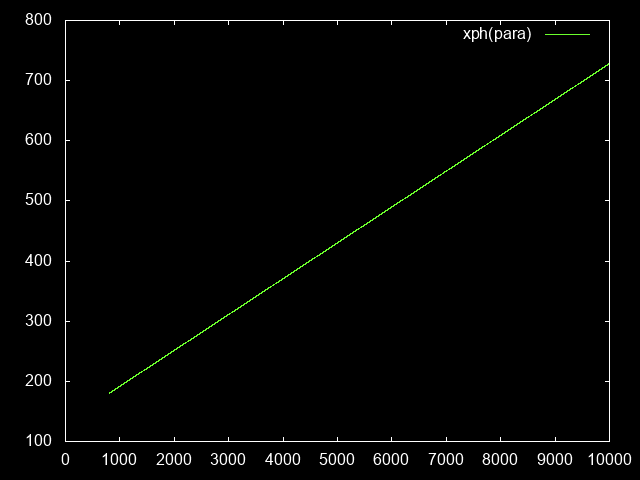
<p>Obviously, we have to take into account the effects of higher paragon levels allowing you to farm more quickly. So first of all, we need to know how much XP/hour we would expect at each paragon level. To do this, let’s assume we continue farming on the same GR level, but clear the rift more quickly. (This is more or less equivalent to farming at a higher GR level but more slowly, close enough for our purposes)</p>
<div class="sourceCode" id="cb13"><pre class="sourceCode haskell"><code class="sourceCode haskell"><span id="cb13-1"><a href="https://haasn.xyz#cb13-1" aria-hidden="true"></a>xphPara(paraLevel) <span class="ot">=</span> baseXph <span class="op">*</span> damagePara(paraLevel)</span></code></pre></div>
<figure>
<img src="https://haasn.xyz/files/d3para/xphPara.png" alt="XP/hr (b) at a given paragon level" /><figcaption aria-hidden="true">XP/hr (b) at a given paragon level</figcaption>
</figure>
<h2 id="time-needed-per-paragon-level">Time needed per paragon level</h2>
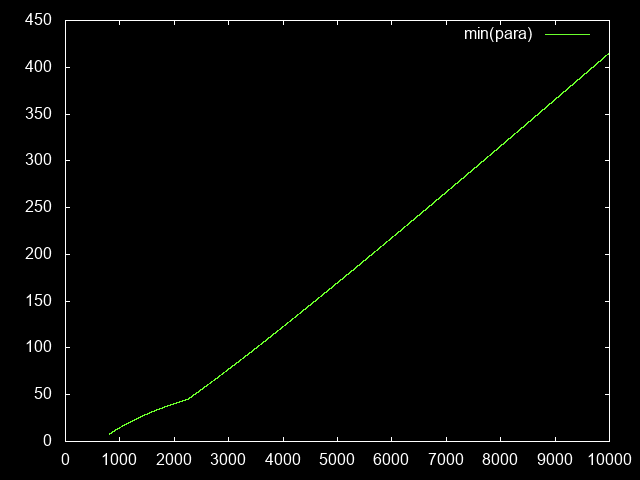
<p>Here’s an interesting aside that will be useful: How many minutes does a single paragon level take?</p>
<div class="sourceCode" id="cb14"><pre class="sourceCode haskell"><code class="sourceCode haskell"><span id="cb14-1"><a href="https://haasn.xyz#cb14-1" aria-hidden="true"></a>hoursPerPara(paraLevel) <span class="ot">=</span> xpLevel(paraLevel) <span class="op">/</span> xphPara(paraLevel)</span>
<span id="cb14-2"><a href="https://haasn.xyz#cb14-2" aria-hidden="true"></a>minPerPara(paraLevel) <span class="ot">=</span> hoursPerPara(paraLevel) <span class="op">*</span> <span class="dv">60</span></span></code></pre></div>
<figure>
<img src="https://haasn.xyz/files/d3para/minPerPara.png" alt="Minutes per paragon level (avg)" /><figcaption aria-hidden="true">Minutes per paragon level (avg)</figcaption>
</figure>
<h2 id="paragon-level-per-hour-of-playtime">Paragon level per hour of playtime</h2>
<p>To know, therefore, how many minutes/hours of farming time we need to reach a certain total paragon level, we can accumulate the previous curve over time:</p>
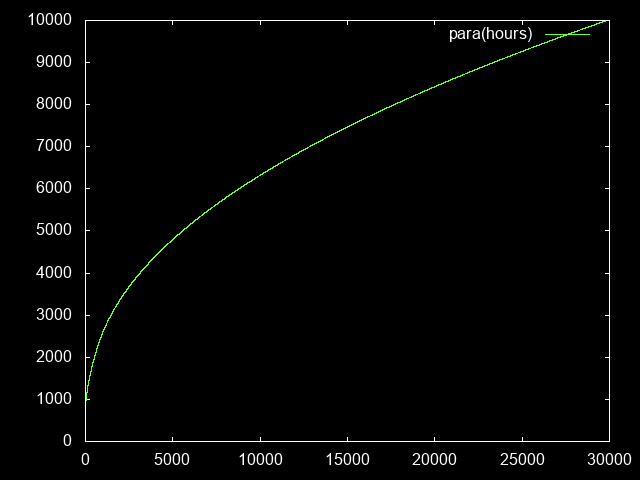
<div class="sourceCode" id="cb15"><pre class="sourceCode haskell"><code class="sourceCode haskell"><span id="cb15-1"><a href="https://haasn.xyz#cb15-1" aria-hidden="true"></a>paraHours <span class="ot">=</span> go <span class="dv">800</span> <span class="dv">0</span> <span class="kw">where</span></span>
<span id="cb15-2"><a href="https://haasn.xyz#cb15-2" aria-hidden="true"></a>  go level hours</span>
<span id="cb15-3"><a href="https://haasn.xyz#cb15-3" aria-hidden="true"></a>    <span class="op">|</span> level <span class="op">&gt;</span> <span class="dv">10000</span> <span class="ot">=</span> []</span>
<span id="cb15-4"><a href="https://haasn.xyz#cb15-4" aria-hidden="true"></a>    <span class="op">|</span> <span class="fu">otherwise</span>     <span class="ot">=</span> (hours, level) <span class="op">:</span> go (level<span class="op">+</span><span class="dv">1</span>) (hours <span class="op">+</span> hoursPerPara(level))</span></code></pre></div>
<figure>
<img src="https://haasn.xyz/files/d3para/paraHours.png" alt="Paragon level as a function of farm time" /><figcaption aria-hidden="true">Paragon level as a function of farm time</figcaption>
</figure>
<figure>
<img src="https://haasn.xyz/files/d3para/paraHoursZoom.png" alt="Paragon level as a function of farm time (zoom)" /><figcaption aria-hidden="true">Paragon level as a function of farm time (zoom)</figcaption>
</figure>
<p>To reach paragon 10,000, one has to play for about 30k hours ≈ 3-4 ingame years.</p>
<h2 id="gr-level-per-hour-of-playtime">GR level per hour of playtime</h2>
<p>Finally, since this is the result I was ultimately interested in, the GR level this translates to, as a function of the time spent grinding:</p>
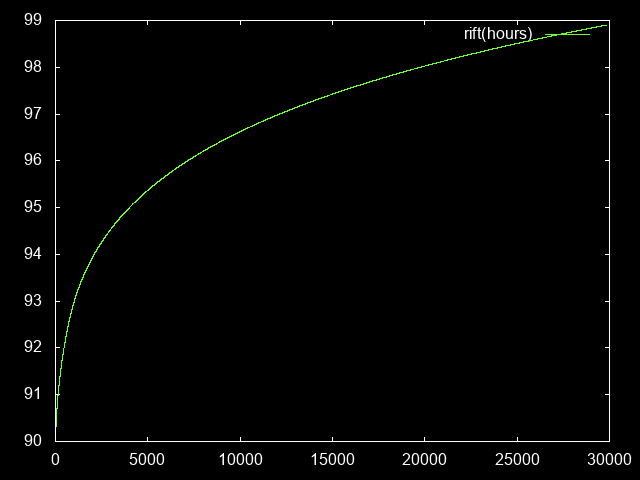
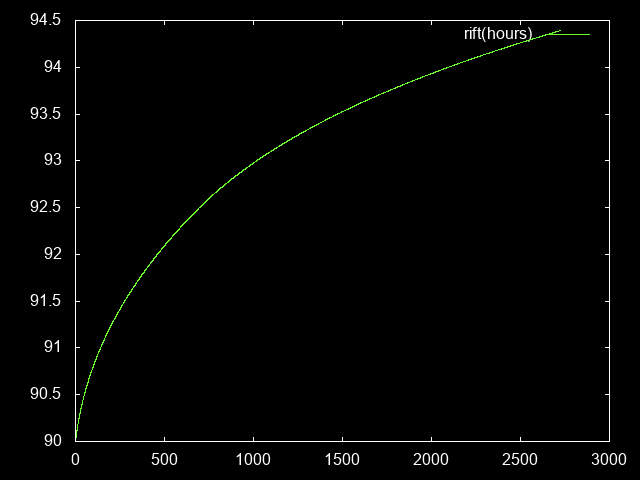
<div class="sourceCode" id="cb16"><pre class="sourceCode haskell"><code class="sourceCode haskell"><span id="cb16-1"><a href="https://haasn.xyz#cb16-1" aria-hidden="true"></a>riftHours <span class="ot">=</span> [ (hours, riftLevelPara(paraLevel)) <span class="op">|</span> (hours, paraLevel) <span class="ot">&lt;-</span> paraHours ]</span></code></pre></div>
<figure>
<img src="https://haasn.xyz/files/d3para/riftHours.png" alt="GR level as a function of farm time" /><figcaption aria-hidden="true">GR level as a function of farm time</figcaption>
</figure>
<figure>
<img src="https://haasn.xyz/files/d3para/riftHoursZoom.png" alt="GR level as a function of farm time (zoom)" /><figcaption aria-hidden="true">GR level as a function of farm time (zoom)</figcaption>
</figure>
<h1 id="summary">Summary</h1>
<p>In summary, how much benefit you get out of the paragon system slows down over time, culminating in the point where you need to invest exponentially increasing amounts of gametime to reach the next GR level.</p>
<p>Might be slightly skewed towards the upper end due to the effects of decreasing incoming damage, but I don’t have a good model for that.</p>
<p>If there’s something I’m unsure about, it’s how your XP/hour increases as a function of your paragon level - it seems like 700b XP/hr might be over-estimating things at the high end. Nonetheless, based on figures I’m seeing from paragon ~4000 players, it seems to match the curve so far.</p>
</section>
</article>
<footer>
<script src="https://utteranc.es/client.js" repo="haasn/blog" issue-term="pathname" label="comments" theme="photon-dark" crossorigin="anonymous" async>
</script>
<noscript>
        <h2>comments and questions can be left <a href="https://github.com/haasn/blog/issues">here</a></h2>
        (or you could enable JavaScript and get comment integration)
</noscript>
</footer>
]]></summary>
</entry>
<entry>
    <title>Falsehoods programmers believe about [video stuff]</title>
    <link href="https://haasn.xyz/posts/2016-12-25-falsehoods-programmers-believe-about-%5Bvideo-stuff%5D.html" />
    <id>https://haasn.xyz/posts/2016-12-25-falsehoods-programmers-believe-about-%5Bvideo-stuff%5D.html</id>
    <published>2016-12-25T00:00:00Z</published>
    <updated>2016-12-25T00:00:00Z</updated>
    <summary type="html"><![CDATA[<article>
<header>
<h1>Falsehoods programmers believe about [video stuff]</h1>
<p>by <em>Niklas Haas</em> on <strong>December 25, 2016</strong></p>
<p>Tagged as: <a title="All pages tagged 'mpv'." href="https://haasn.xyz/tags/mpv.html">mpv</a>, <a title="All pages tagged 'video'." href="https://haasn.xyz/tags/video.html">video</a>.</p>
</header>

<section>
<p>Inspired by numerous other such lists of falsehoods. Pretty much every video player in existence gets a good chunk if not the vast majority of these wrong. (Some of these also/mostly apply to users, though)</p>
<h1 id="falsehoods-programmers-believe-about..">Falsehoods programmers believe about..</h1>
<h2 id="video-decoding">.. video decoding</h2>
<ul>
<li>decoding is bit-exact, so the decoder used does not affect the quality</li>
<li>since H.264 decoding is bit-exact, the decoder used does not affect the quality<a href="https://haasn.xyz#fn1" class="footnote-ref" id="fnref1" role="doc-noteref"><sup>1</sup></a></li>
<li>hardware decoding means I don’t have to worry about performance</li>
<li>hardware decoding is always faster than software decoding</li>
<li>a H.264 hardware decoder can decode all H.264 files</li>
<li>a H.264 software decoder can decode all H.264 files</li>
<li>video decoding is easily parallelizable</li>
</ul>
<h2 id="video-playback">.. video playback</h2>
<ul>
<li>the display’s refresh rate will be an integer multiple of the video file’s frame rate</li>
<li>the display’s clock will be in sync with the audio clock</li>
<li>I can accurately measure the display’s clock</li>
<li>I can accurately measure the audio clock</li>
<li>I can exclusively use the audio clock for timing</li>
<li>I can exclusively use the video clock for timing</li>
<li>my hardware contexts will survive the user’s coffee break</li>
<li>my hardware contexts will never disappear in the middle of playback</li>
<li>I can always request a new hardware context after my previous one disappeared</li>
<li>it’s okay to error and quit if I can’t request a hardware context</li>
<li>hardware decoding and video playback will happen on the same device</li>
<li>transferring frames from one device to another is easy</li>
<li>the user will not notice 3:2 pulldown</li>
<li>the user will not notice the odd dropped or duplicated frame</li>
<li>all video frames will be unique</li>
<li>all video frames will be decoded in order</li>
<li>all video sources can be seeked in</li>
<li>the user will never want to seek to non-keyframes</li>
<li>seeking to a position will produce the same output as decoding to a position</li>
<li>I can seek to a specific frame number</li>
<li>videos have a fixed frame rate</li>
<li>all frame timestamps are precise</li>
<li>all frame timestamps are precise in modern formats like .mkv</li>
<li>all frame timestamps are monotonically increasing</li>
<li>all frame timestamps are monotonically increasing as long as you don’t seek</li>
<li>all frame timestamps are unique</li>
<li>the duration of the final video frame is always known</li>
<li>users will not notice if I skip the final video frame</li>
<li>users will never want to play videos in reverse</li>
<li>users will not notice if I skip a video frame when pausing</li>
</ul>
<h2 id="videoimage-files">.. video/image files</h2>
<ul>
<li>all video files have 8-bit per channel color</li>
<li>all video files have 8-bit or 10-bit per channel color</li>
<li>fine, but at least all channels are going to have the same number of bits</li>
<li>all samples are going to fit into a 32-bit integer</li>
<li>every pixel consists of three samples</li>
<li>every pixel consists of three or four samples</li>
<li>fine, every pixel consists of n samples</li>
<li>all images files are sRGB</li>
<li>all video files are BT.601 or BT.709</li>
<li>all image files are either sRGB or contain an ICC profile</li>
<li>4:2:0 is the only way to subsample images</li>
<li>all image files contain correct tags indicating their color space</li>
<li>interlaced video files no longer exist</li>
<li>I can detect whether a file is interlaced or not</li>
<li>the chroma location is the same for every YCbCr file</li>
<li>all HD videos are BT.709</li>
<li>video files will have the same refresh rate throughout the stream</li>
<li>video files will have the same resolution throughout the stream</li>
<li>video files will have the same color space throughout the stream</li>
<li>video files will have the same pixel format throughout the stream</li>
<li>fine, videos will have the same video codec throughout the stream</li>
<li>the video and audio tracks will start at the same time</li>
<li>the video and audio tracks will both be present throughout the stream</li>
<li>I can start playing an audio file at the first decoded sample, and stop playing it at the last</li>
<li>virtual timelines can be implemented on the demuxer level</li>
<li>adjacent frames will have similar durations</li>
<li>all multimedia formats have easily identifiable headers</li>
<li><a href="https://github.com/mpv-player/mpv/issues/3973">a file will never be a legal JPEG and MP3 at the same time</a></li>
<li>applying heuristics to guess the right filetype is easy</li>
</ul>
<h2 id="image-scaling">.. image scaling</h2>
<ul>
<li>the GPU’s built-in bilinear scaling is sufficient for everybody</li>
<li>bicubic scaling is sufficient for everybody</li>
<li>the image can just be scaled in its native color space</li>
<li>I should linearize before scaling</li>
<li>I shouldn’t linearize before scaling</li>
<li>upscaling is the same as downscaling</li>
<li>the quality of scaling algorithms can be objectively measured</li>
<li>the slower a scaling algorithm is to compute, the better it will be</li>
<li>upscaling algorithms can invent information that doesn’t exist in the image</li>
<li>my scaling ratio is going to be the same in the x axis and the y axis</li>
<li>chroma upscaling isn’t as important as luma upscaling</li>
<li>chroma and luma can/should be scaled separately</li>
<li>I can ignore sub-pixel offsets when scaling and aligning planes</li>
<li>I should always take sub-pixel offsets into account when scaling</li>
<li>images contain no information above the Nyquist frequency</li>
<li>images contain no information outside the TV signal range</li>
</ul>
<h2 id="color-spaces">.. color spaces</h2>
<ul>
<li>all colors are specified in (R,G,B) triples</li>
<li>all colors are specified in RGB or CMYK</li>
<li>fine, all colors are specified in RGB, CMYK, HSV, HSL, YCbCr or XYZ</li>
<li>there is only one RGB color space</li>
<li>there is only one YCbCr color space for each RGB color space</li>
<li>fine, there is only one YCbCr color space for each RGB color space up to linear isomorphism</li>
<li>an RGB triple unambiguously specifies a color</li>
<li>an RGB triple + primaries unambiguously specifies a color</li>
<li>fine, a CIE XYZ triple unambiguously specifies a color</li>
<li>black is RGB (0,0,0), and white is RGB (255,255,255)</li>
<li>all color spaces have the same white point</li>
<li>color spaces are defined by the RGB primaries and white point</li>
<li>my users are not going to notice the difference between BT.601 and BT.709</li>
<li>there’s only one BT.601 color space</li>
<li>TV range YCbCr is the same thing as TV range RGB</li>
<li>full-range YCbCr doesn’t exist</li>
<li>standards bodies can agree on what full-range YCbCr means</li>
<li>b-bit full range means the interval [0, 2^b-1]</li>
<li>a full range 8-bit color value of 255 maps to the float 1.0</li>
<li>color spaces are two-dimensional</li>
<li>“linear light” means “linear light”</li>
<li>information outside of the interval [0,1] should always be discarded/clamped</li>
<li>all gamma curves are well defined outside of the interval [0,1]</li>
<li>HDR encoding is about making the image brighter</li>
<li>HDR encoding means darker blacks</li>
</ul>
<h2 id="color-conversion">.. color conversion</h2>
<ul>
<li>I don’t need to convert an image’s colors before displaying it on the screen</li>
<li>all color spaces are just linearly related</li>
<li>there’s only one way to convert between color spaces</li>
<li>I can just clip out-of-gamut colors after conversion</li>
<li>there’s only one way to pull 10-bit colors up to 16-bit precision</li>
<li>linearization happens after RGB conversion</li>
<li>I can freely convert between color spaces as long as I allow out-of-gamut colors</li>
<li>converting between color spaces is a mathematical process so it doesn’t depend on the display</li>
<li>converting from A to B is just the inverse of converting from B to A</li>
<li>the OOTF is conceptually part of the OETF</li>
<li>the OOTF is conceptually part of the EOTF</li>
<li>all OOTFs are reversible</li>
<li>all CMMs implement color conversion correctly</li>
<li>all professional CMMs implement color conversion correctly</li>
<li>I don’t need to dither after converting if the target colorspace is the same bit depth or higher</li>
<li>converting between bit depths is just a logical shift</li>
<li>converting between bit depths is just a multiplication</li>
<li>all ICC profiles contain tables for conversion in both directions</li>
<li>HDR tone-mapping is well-defined</li>
<li>HDR tone-mapping is well-defined if you know the source and target display capabilities</li>
<li>HDR metadata will always match the video stream</li>
<li>you can easily convert between PQ and HLG</li>
<li>you can easily convert between PQ and HLG if you know the mastering display’s metadata</li>
<li>converting from A to linear light to B gives you the same result as converting from A to B</li>
</ul>
<h2 id="video-output">.. video output</h2>
<ul>
<li>the graphics API will dither my output for me</li>
<li>there’s only one way to dither output</li>
<li>I need to dither to whatever my backbuffer precision is</li>
<li>dithering with random noise looks good</li>
<li>dithering artifacts are not visible at 6-bit precision</li>
<li>dithering artifacts are not visible at 7-bit precision</li>
<li>dithering artifacts are not visible at 8-bit precision</li>
<li>temporal dithering is better than static dithering</li>
<li>OpenGL is well-supported on all operating systems</li>
<li>OpenGL is well-supported on any operating system</li>
<li>waiting until the next vsync is easy in OpenGL</li>
<li>video drivers correctly implement the texture formats they advertise</li>
<li>I can accurately measure vsync timings</li>
<li>vsync timings are consistent for a fixed refresh rate</li>
<li>all displays with the same rate will vsync at the same time</li>
<li>I can control the window size and position</li>
</ul>
<h2 id="displays">.. displays</h2>
<ul>
<li>all displays are 60 Hz</li>
<li>all refresh rates are integers</li>
<li>all displays have a fixed refresh rate</li>
<li>all displays are sRGB</li>
<li>all displays are approximately sRGB</li>
<li>displays have an infinite contrast</li>
<li>all displays have a contrast of around 1000:1</li>
<li>all displays have a white point of D65</li>
<li>all displays have square pixels</li>
<li>all displays use 8-bit per channel color</li>
<li>all displays are PC displays</li>
<li>my users will provide an ICC profile for their display</li>
<li>my users will only use a single display</li>
<li>my users will only use a single display for the duration of a video</li>
<li>all ICC profiles for displays will have the same rendering intent</li>
<li>all ICC profiles for displays will be black-scaled</li>
<li>all ICC profiles for displays won’t be black-scaled</li>
</ul>
<h2 id="subtitles">.. subtitles</h2>
<ul>
<li>all subtitle files are UTF-8 encoded</li>
<li>all subtitles are stored/rendered as RGB</li>
<li>I can paint RGB subtitles on top of my RGB video files</li>
<li>I don’t need to worry about color management for subtitles</li>
<li>the subtitle color space will be the same as the video color space</li>
<li>rendering subtitles at the output resolution is always better than rendering them at the video resolution</li>
<li>there’s an ASS specification</li>
</ul>
<section class="footnotes" role="doc-endnotes">
<hr />
<ol>
<li id="fn1" role="doc-endnote"><p>It seems a lot of people have misunderstood this one, so let me clarify what I mean: Of course, H.264 decoders (assuming no bugs) will output the same result, but the problem in practice is that you have no guarantee you’ll actually be able to access the decoder outputs unmodified, because APIs like DXVA/DXVA2, D3D11VA (through ANGLE), CrystalHD, VAAPI through GLX and VDPAU (unless you use a terrible interlaced-only hack) will further post process the results before you can access them, either by converting to RGB, changing the subsampling or rounding down 10-bit content down to 8-bit.</p>
<p>There are some APIs which are inherently safe, though, although it usually requires copying back to system RAM instead of exposing it as an on-GPU texture, so you gain extra round-trip bandwidth losses (bidirectional, instead of the one-directional cost you have to pay for swdec). The only exceptions I can think of right now are VAAPI EGL interop and CUDA.<a href="https://haasn.xyz#fnref1" class="footnote-back" role="doc-backlink">↩︎</a></p></li>
</ol>
</section>
</section>
</article>
<footer>
<script src="https://utteranc.es/client.js" repo="haasn/blog" issue-term="pathname" label="comments" theme="photon-dark" crossorigin="anonymous" async>
</script>
<noscript>
        <h2>comments and questions can be left <a href="https://github.com/haasn/blog/issues">here</a></h2>
        (or you could enable JavaScript and get comment integration)
</noscript>
</footer>
]]></summary>
</entry>
<entry>
    <title>FFmpeg HEVC decoding benchmarks</title>
    <link href="https://haasn.xyz/posts/2016-11-08-ffmpeg-hevc-decoding-benchmarks.html" />
    <id>https://haasn.xyz/posts/2016-11-08-ffmpeg-hevc-decoding-benchmarks.html</id>
    <published>2016-11-08T00:00:00Z</published>
    <updated>2016-11-08T00:00:00Z</updated>
    <summary type="html"><![CDATA[<article>
<header>
<h1>FFmpeg HEVC decoding benchmarks</h1>
<p>by <em>Niklas Haas</em> on <strong>November  8, 2016</strong></p>
<p>Tagged as: <a title="All pages tagged 'mpv'." href="https://haasn.xyz/tags/mpv.html">mpv</a>, <a title="All pages tagged 'ffmpeg'." href="https://haasn.xyz/tags/ffmpeg.html">ffmpeg</a>, <a title="All pages tagged 'benchmarks'." href="https://haasn.xyz/tags/benchmarks.html">benchmarks</a>.</p>
</header>

<section>
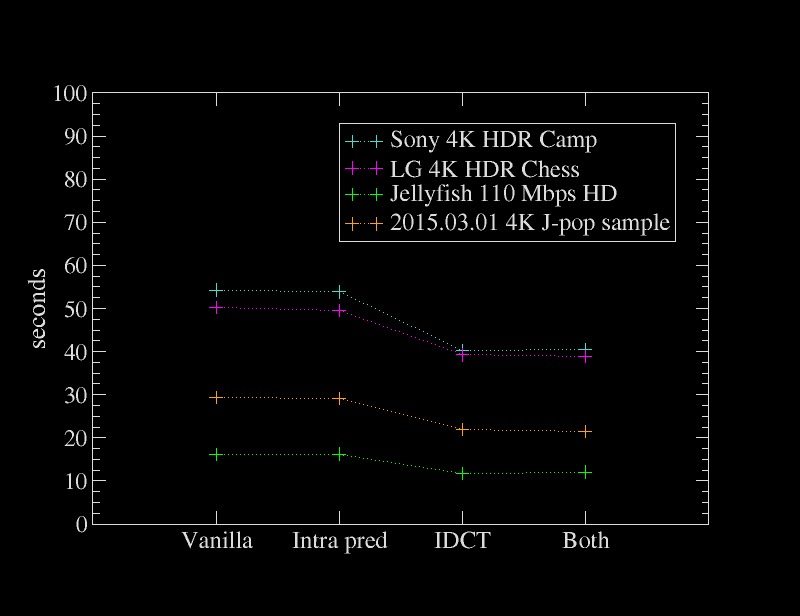
<p>Since HEVC software decoding is still very much relevant (especially as hardware decoding chips are both scarce and limited), I decided to compile a few of the benchmark numbers I’ve gotten in the past into a set of graphs.</p>
<h2 id="performance-boost-from-openhevc-intrinsics">Performance boost from OpenHEVC intrinsics</h2>
<p>These patches still made a very big difference on current git master. Test was done using ffmpeg version <code>N-82299-g0a24587</code> and <a href="https://raw.githubusercontent.com/haasn/gentoo-conf/1922546a8f9b46f47ea94d2f053470597afcade1/etc/portage/patches/media-video/ffmpeg/openhevc_intrinsics.patch">this patchset</a></p>
<figure>
<img src="https://haasn.xyz/files/openhevc/img.png" alt="Time to decode 3000 frames (large, SVG)" /><figcaption aria-hidden="true">Time to decode 3000 frames (<a href="https://haasn.xyz/files/openhevc/full.png">large</a>, <a href="https://haasn.xyz/files/openhevc/full.svg">SVG</a>)</figcaption>
</figure>
<p>Interestingly enough, the intra pred SIMD basically made no difference at all, even making the result slightly slower, but the IDCT still helped a lot. Looking at the code, I can’t find an obvious explanation for this - the HEVC intra pred in FFmpeg is still very much C. Perhaps the compiler just does a good job of optimizing here, or perhaps the OpenHEVC intrinsics are just bad.<a href="https://haasn.xyz#fn1" class="footnote-ref" id="fnref1" role="doc-noteref"><sup>1</sup></a></p>
<p>Either way, seems like it’s best to keep this patch off. I have adjusted <a href="https://github.com/haasn/gentoo-conf/tree/xor/etc/portage/patches/media-video/ffmpeg">my own FFmpeg patches</a> accordingly.</p>
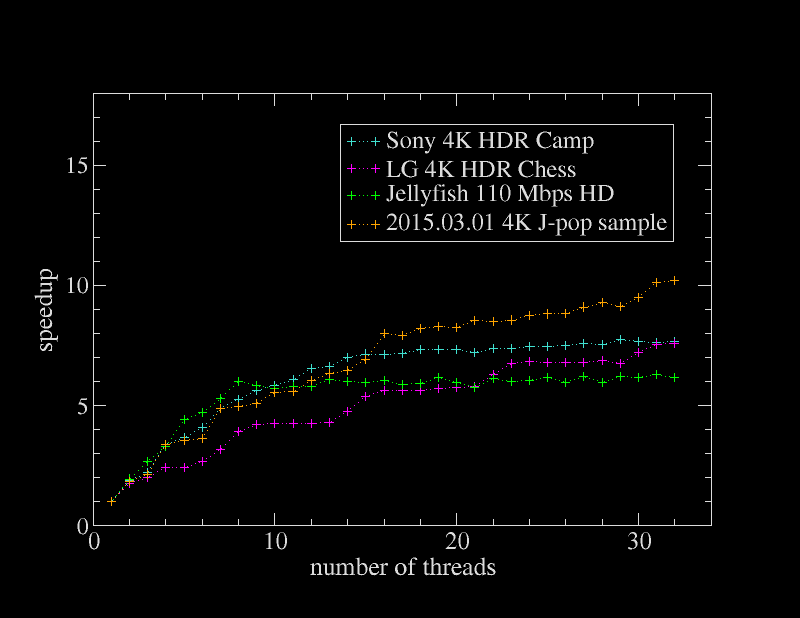
<h2 id="time-to-decode-vs.-number-of-threads">Time to decode vs. number of threads</h2>
<p>In case you’re crazy enough to buy a 16-core machine for video processing, you’re not going to get great results out of software decoding after the first few cores.</p>
<p>Tests were done using ffmpeg version <code>N-82215-g3932ccc</code> with both OpenHEVC intrinsics patches applied.</p>
<figure>
<img src="https://haasn.xyz/files/ffmpeg-threads/img.png" alt="Speedup decoding 3000 frames" /><figcaption aria-hidden="true">Speedup decoding 3000 frames</figcaption>
</figure>
<section class="footnotes" role="doc-endnotes">
<hr />
<ol>
<li id="fn1" role="doc-endnote"><p>BBB from the #ffmpeg-devel IRC offers this explanation:</p>
<pre><code>2016-12-31 16:17:29	@BBB	haasn: the reason intra pred simd doesn’t help is b/c most intra pred is dc, and dc is very trivial in c or simd
2016-12-31 16:17:39	@BBB	haasn: runtime of dc C vs. idct C is like 1:10 or so
2016-12-31 16:17:57	@BBB	haasn: directional intra pred is more complicated, but runs sparsely
2016-12-31 16:18:22	@BBB	(from my memory)
2016-12-31 16:52:10	haasn	BBB: I did a `perf` and the most time was spent in that hevc_cabac function
2016-12-31 16:52:11	haasn	or w/e
2016-12-31 16:55:49	@BBB	haasn: yeah that’s residual decoding, that is normal
2016-12-31 16:55:57	@BBB	haasn: unfortunately not really simd'able
2016-12-31 16:56:03	@BBB	I guess you can try simd’ing the bypass function
2016-12-31 16:56:06	@BBB	but that’s hard
2016-12-31 16:56:10	@BBB	and I Don’t care about hevc ;)</code></pre>
<a href="https://haasn.xyz#fnref1" class="footnote-back" role="doc-backlink">↩︎</a></li>
</ol>
</section>
</section>
</article>
<footer>
<script src="https://utteranc.es/client.js" repo="haasn/blog" issue-term="pathname" label="comments" theme="photon-dark" crossorigin="anonymous" async>
</script>
<noscript>
        <h2>comments and questions can be left <a href="https://github.com/haasn/blog/issues">here</a></h2>
        (or you could enable JavaScript and get comment integration)
</noscript>
</footer>
]]></summary>
</entry>
<entry>
    <title>How to watch a live stream from the beginning in mpv</title>
    <link href="https://haasn.xyz/posts/2016-11-04-how-to-watch-a-live-stream-from-the-beginning-in-mpv.html" />
    <id>https://haasn.xyz/posts/2016-11-04-how-to-watch-a-live-stream-from-the-beginning-in-mpv.html</id>
    <published>2016-11-04T00:00:00Z</published>
    <updated>2016-11-04T00:00:00Z</updated>
    <summary type="html"><![CDATA[<article>
<header>
<h1>How to watch a live stream from the beginning in mpv</h1>
<p>by <em>Niklas Haas</em> on <strong>November  4, 2016</strong></p>
<p>Tagged as: <a title="All pages tagged 'mpv'." href="https://haasn.xyz/tags/mpv.html">mpv</a>, <a title="All pages tagged 'tips'." href="https://haasn.xyz/tags/tips.html">tips</a>.</p>
</header>

<section>
<p>If you try watching a video recording on twitch etc. while it’s still ‘live’, mpv/youtube-dl will play the live video instead of starting from the beginning.</p>
<p>The fix is straightforward: By appending <code>?t=0m</code> you can force it to start at the beginning:</p>
<div class="sourceCode" id="cb1"><pre class="sourceCode bash"><code class="sourceCode bash"><span id="cb1-1"><a href="https://haasn.xyz#cb1-1" aria-hidden="true"></a><span class="ex">mpv</span> <span class="st">'https://www.twitch.tv/example/v/12345?t=0'</span></span></code></pre></div>
<p>This is also useful for a second purpose: seeking. Normally, by trying to seek a live stream like this in mpv you will end up buffering and downloading forever. (I’m not exactly sure what’s going on since the mpv cache is so opaque, but I have to imagine it’s actually trying to download all the data you skipped past)</p>
<p>By changing it to e.g. <code>?t=20m</code> you can seek to 20 minutes in the stream.</p>
</section>
</article>
<footer>
<script src="https://utteranc.es/client.js" repo="haasn/blog" issue-term="pathname" label="comments" theme="photon-dark" crossorigin="anonymous" async>
</script>
<noscript>
        <h2>comments and questions can be left <a href="https://github.com/haasn/blog/issues">here</a></h2>
        (or you could enable JavaScript and get comment integration)
</noscript>
</footer>
]]></summary>
</entry>
<entry>
    <title>So apparently this is a blog now</title>
    <link href="https://haasn.xyz/posts/2016-11-03-so-apparently-this-is-a-blog-now.html" />
    <id>https://haasn.xyz/posts/2016-11-03-so-apparently-this-is-a-blog-now.html</id>
    <published>2016-11-03T00:00:00Z</published>
    <updated>2016-11-03T00:00:00Z</updated>
    <summary type="html"><![CDATA[<article>
<header>
<h1>So apparently this is a blog now</h1>
<p>by <em>Niklas Haas</em> on <strong>November  3, 2016</strong></p>
<p>Tagged as: <a title="All pages tagged 'meta'." href="https://haasn.xyz/tags/meta.html">meta</a>, <a title="All pages tagged 'personal'." href="https://haasn.xyz/tags/personal.html">personal</a>.</p>
</header>

<section>
<p>I just copied the template and code from <a href="http://blog.clement.delafargue.name/">this guy’s blog</a> because it was the first thing in <a href="https://jaspervdj.be/hakyll/examples.html">this list of Hakyll examples</a> that looked reasonably nice (and I was too lazy to look at more).</p>
<h2 id="why">Why?</h2>
<p>Because I keep spending time looking up things I’ve already documented on IRC, usually in the form of “something broke, let me document how to fix it and hope I find it again in the future”.</p>
<p>Hopefully doing it here should make it somewhat easier for me to find my own fixes again.</p>
<h2 id="why-hakyll">Why Hakyll?</h2>
<p>Why not?</p>
</section>
</article>
<footer>
<script src="https://utteranc.es/client.js" repo="haasn/blog" issue-term="pathname" label="comments" theme="photon-dark" crossorigin="anonymous" async>
</script>
<noscript>
        <h2>comments and questions can be left <a href="https://github.com/haasn/blog/issues">here</a></h2>
        (or you could enable JavaScript and get comment integration)
</noscript>
</footer>
]]></summary>
</entry>

</feed>